By far the biggest worry I hear from people who want to start out in low poly and create their own characters is that they don't know how to draw.
So I wanted to prove, once and for all, that literally anyone can get into low poly modeling.
It genuinely doesn't require drawing skills.
Or any other kind of background.
The number one reason you don't need to know how to draw?
Character blockouts.
You can literally block out your character in 3D using simple shapes, and use that as your "sketch" / character design, instead of a 2D drawing you'd make on paper or in Photoshop.
And honestly, there's no one better suited to teach this than Keven (@KeyframeChef)!
So I asked him to share some tips on how he blocks out his amazing low-poly characters!
Starting simple
Breaking up your character into simple shapes is the first thing to do when starting work on a character.
Understanding the form of the character is more important than ensuring specific details or topology are in place; those can always come after.
The shapes you use should be kept fairly straightforward; for now, hands could be composed of several cubes, or the head could be a simple rounded cube.
In this example, we'll be making a blockout of the Love-chan character, my original character that I teach you to create - even if you've never opened Blender - in my low poly course (currently on sale).
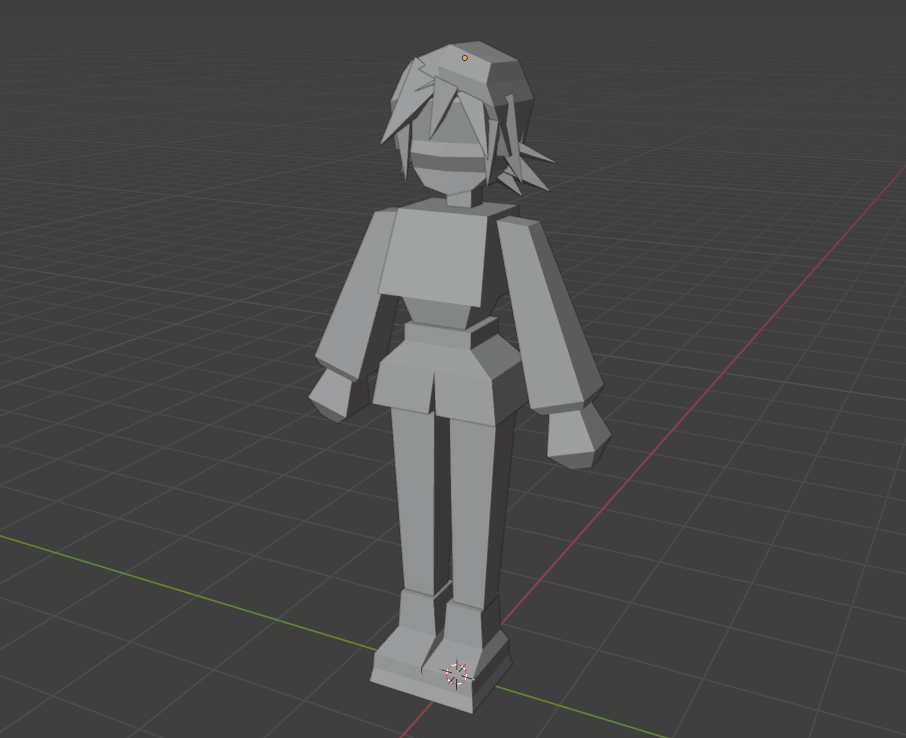
For this simple draft of a block out, basic shapes from the reference were made entirely from modified cubes; the hair tufts were made by making a cube into a pyramid and pasting them around, and other parts of the outfit were simply made by extruding or scaling cubes.
Nothing is properly separated or aligned yet; for now, it's all about shape.
Focusing on the silhouette
It's also really important to give the character a strong silhouette; being able to tell one character apart from the next is important!
Making sure parts of a character read well from different angles or that they still look distinct from a distance are critical parts of ensuring your silhouette is great. Establishing a strong silhouette early-on is important for creating a great model.
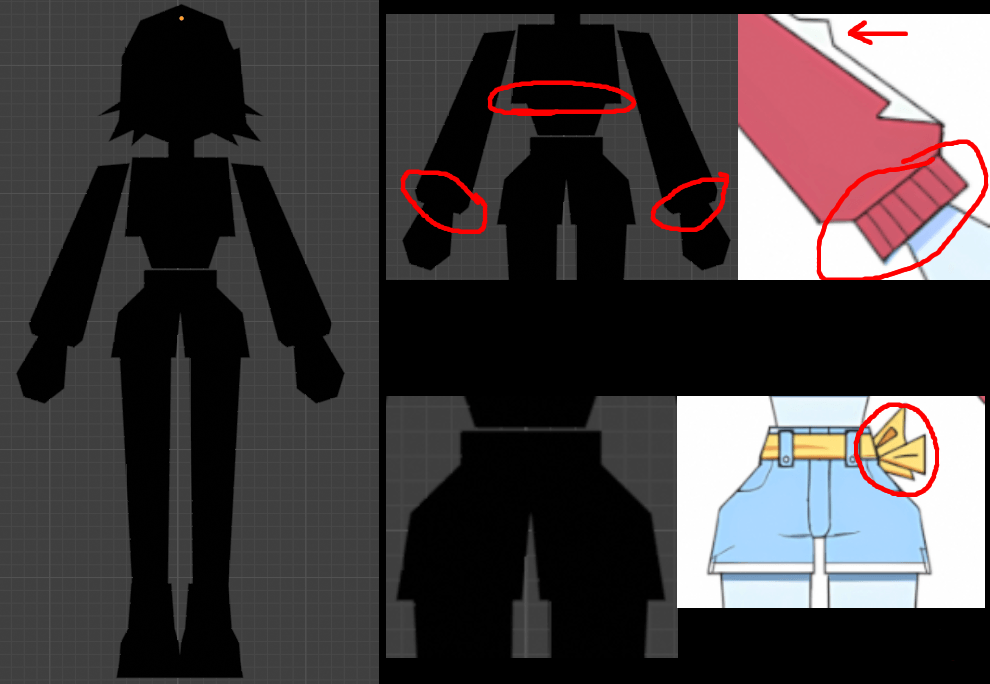
In this draft blockout of Love-chan, the silhouette is alright! There's some distinct features that stick out, such as details from her jacket and pants. The cropped top and sleeves in particular help add form, as well as the tied part of the belt.
As the model improves, adding more specific details such as the ribbing on the clothes and belt details can also help a lot and better define the shape, improving the silhouette!
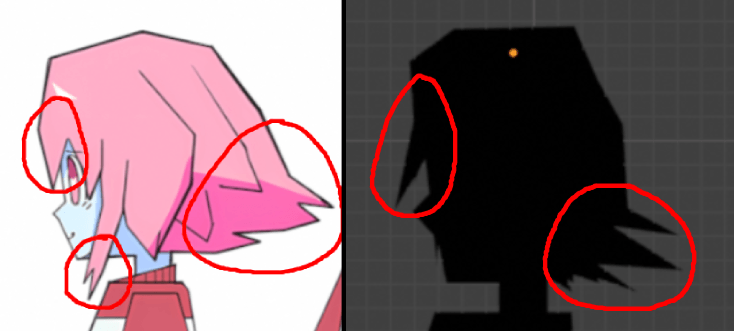
From the side, the hair is likely one of the elements apart from the torso that would help tell her apart from other characters in a scene; it should be better defined before moving on so it can be a strong detail later on in the process. In particular, the volume and amount of hair that sticks out is very distinctive!
To improve this blockout further, the shape of the hair could be better defined and match the reference more closely to improve the readability and distinctness of the silhouette.
Using multiple angles
One of the most important things to get right in the block-out phase is the proportions! It's important to look at your character from a variety of different angles to catch when something looks odd or off.
Viewing your character from top, bottom, or other uncommon angles is incredibly helpful for catching proportion or form problem areas which could become a bigger problem later in the modeling process.
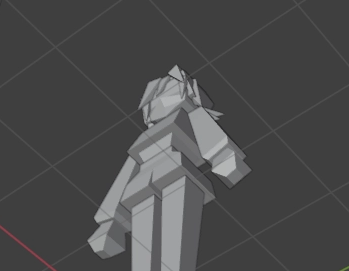
In this instance here, the hair is not easy to see from this angle. The part you can see past the bangs should be brought forward to make the head more readable and nicer to look at.
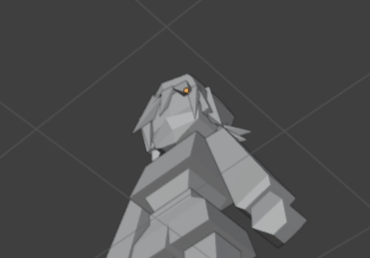
After making some adjustments to the bangs and hair at the top of the head, it's a lot easier to get a sense of where the top of Love-chan's head is!
Utilizing references
References are a huge way to eliminate guesswork and help with proportions and form!
Keeping anatomy studies or other blockouts handy to re-evaluate your model is immensely useful for ensuring it looks correct.
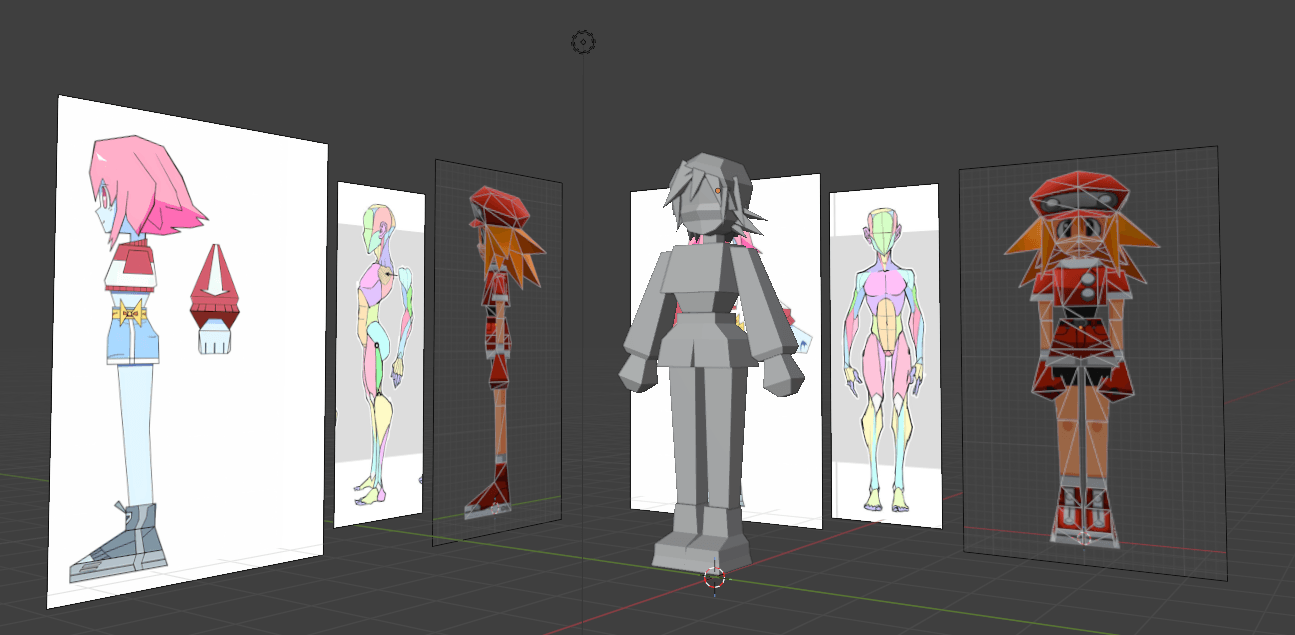
While working on this draft blockout, references of Love-chan and Roll Caskett were used to help with achieving the proportion-style from Mega Man Legends. An additional humanoid reference was used to ensure general proportions were correct for a human character like Love-chan.
Making annotations on references and comparing relative sizes of body parts as you model them is a good way to keep things proportional!
Knowing when to move on
It's easy to endlessly tweak a draft until it feels "good enough", but it's also important to be able to move on to refining your model once proportions feel correct and the overall form of the model is readable.
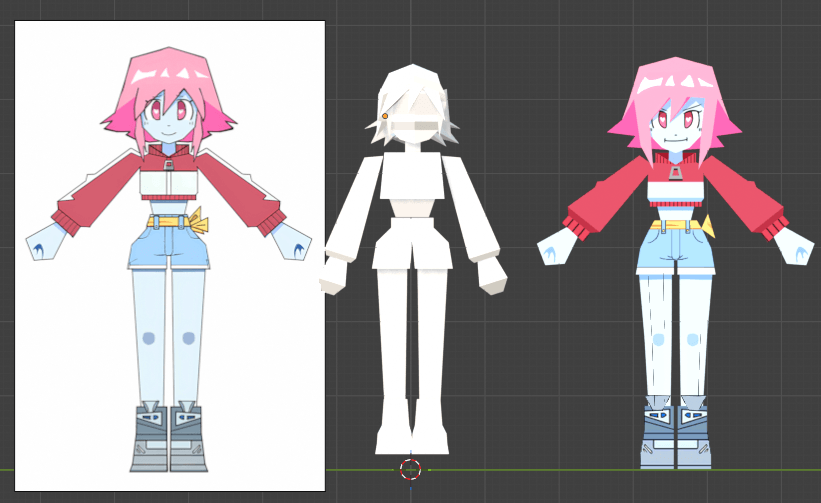
In the case of this blockout, more care should be put into the hair and a few smaller details before moving on to improve the form of the model. Overall, however, the general shape and proportions of the arms and legs are fairly close to the reference, so those shouldn't take much adjustment before moving on.
Thank you again to Keven for providing these tips–there's so much good advice for beginners, and fully utilizing these tips is a huge way to improve your ability to model characters.
That's also why I think low-poly is an incredible starting point for making characters in 3D–you can keep it simple throughout the whole modeling process, and still create something amazing.
My entire Low Poly Character course is built around keeping it simple, and giving you tangible results in just a few hours!
So far, more than 5,000 students have used the course to create their own low-poly characters, even without prior experience drawing or modeling.
💖 The course is currently on a discount (ends August 31)!
You can check it out here: crashsune.com/low-poly-course